

Don’t know how to fix the 10007 Save Failed error in Black Myth: Wukong? It’s a common issue that can mess up your game. But no need to stress—this guide has got your back.
We’ll walk you through some simple fixes, like adjusting compatibility settings, verifying your game files, and tweaking your antivirus settings.
Plus, you can also check how to get Black Myth Wukong Weapons in the game. Let’s jump in and get everything sorted so you can get back to your adventure!
Methods To Fix 10007 Save Failed Error in Black Myth Wukong Game

The 10007 Save Failed error in Black Myth: Wukong can throw a wrench in your game by stopping you from saving your progress. This can mess up your gameplay and halt your progress.
The problem might come from different sources like game settings, file corruption, or even conflicts with your antivirus software.
Black Myth: Wukong is out now for Windows PC and PlayStation 5, with an Xbox version on the way. If you’re dealing with this error, it could be due to not having enough storage space, permission issues, or your antivirus getting in the way.
Losing your game progress is frustrating, but don’t stress—stick around to discover how to fix the 10007 Save failed error in Black Myth Wukong.
Method 1: Adjust Compatibility Settings To Fix 10007 Save Failed Error
Follow these steps to adjust the compatibility settings to fix the 10007 save failed error in your Blavk Myth Wukong game:
> Find Your Game on Steam: Open up Steam and locate Black Myth: Wukong in your library.
> Access Game Properties: Click the gear icon next to the game title, go to Properties, and then click on the Local Files tab.
> Open the Game Folder: Click Browse to navigate to where the game is installed.
> Change Launcher Properties: Right-click the game’s launcher file and choose Properties.
> Set Compatibility Mode: In the Compatibility tab, check the box for Run this program in compatibility mode, and select Windows 8. Also, make sure to check the box for Run this program as an administrator.
> Apply and Test: Click Apply, then OK, and try starting the game again to see if this fixes the problem.
Method 2: Verify Game Files To Fix 10007 Save Failed Error
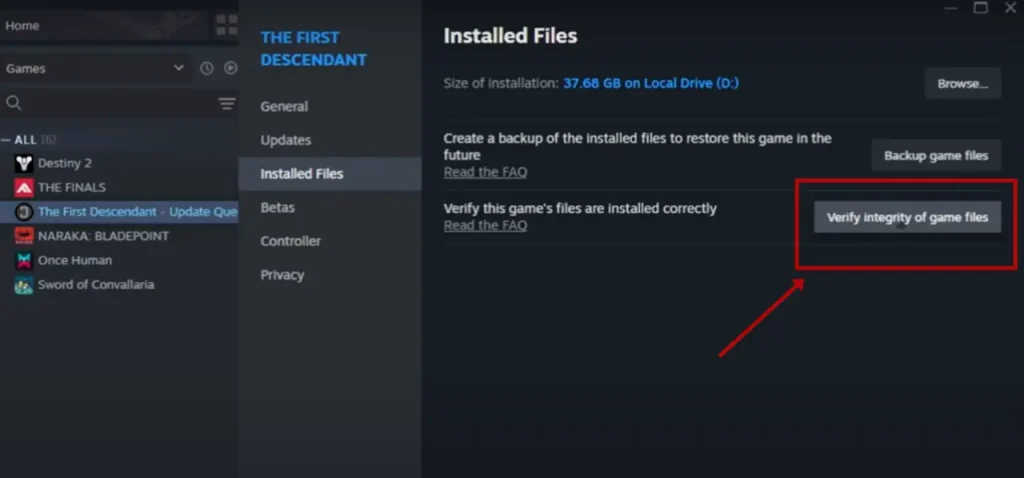
Follow the below-mentioned steps to verify the game files:
> Revisit Game Properties: If you’re still seeing the error, go back to Steam, click the gear icon for Black Myth: Wukong, and select Properties.
> Verify Game Files: Go to the Local Files tab and select Verify Integrity of Game Files to check and repair any corrupted or missing files.
> Restart Your PC: After the scan completes, restart your computer and check if the problem is resolved.
Method 3: Check Storage and Repair Steam
Follow these steps to check storage and repair steam:
> Check Storage Space: Open File Explorer and make sure you have enough free space on the drive where the game is installed.
> Repair Steam: If space isn’t the problem, open Steam, go to Settings (from the top-right menu), then Downloads, and click the three dots next to Download Region to select Repair Library Folders.
> Clear Steam Cache: In the Downloads section, click Clear Download Cache, confirm the action, and then restart Steam.
Method 4: Update System and Drivers To Fix 10007 Save Failed Error
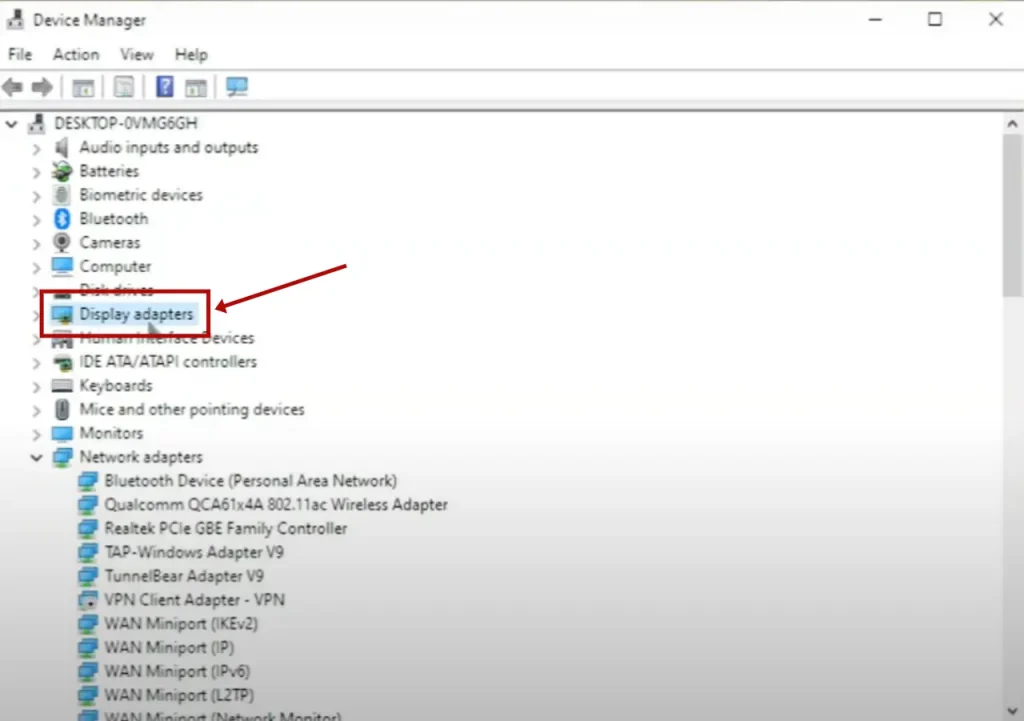
Follow these steps to update your system drivers:
> Update Windows: Make sure your Windows is up to date by going to Settings, searching for Update, and installing any available updates.
> Update Graphics Drivers:
- For NVIDIA Users: Open the NVIDIA Control Panel or GeForce Experience and update your drivers there.
- For AMD Users: Open AMD Radeon Software and update your drivers.
Method 5: Adjust Bitdefender Settings
Lastly, you can try adjusting the Bitdefender Settings by following these steps:
> Update Bitdefender: First, make sure Bitdefender is up to date by opening the app and checking for updates.
> Access Protection Settings: Go to the Protection tab in Bitdefender.
> Manage Exceptions: Click on Antivirus, then go to the Settings tab and select Manage Exceptions.
> Add Black Myth: Wukong as an Exception: Click Add an Exception, find the game’s installation folder (typically ‘C:\Program Files (x86)\Steam\steamapps\common\Black Myth: Wukong’), and add it. Be sure to include all options—On-Access Scan, On-Demand Scan, and Embedded Scripts.
> Save and Restart: Click Save to apply the changes, then launch Black Myth: Wukong and see if the error is fixed.
Give these steps a try and you should be able to fix the save error and get back to your game. If you’re still having trouble, reaching out to the game’s support team might help.
Video Guide To Fix 10007 Save Failed Error In Black Myth Wukong
Conclusion
The 10007 Save Failed error in Black Myth: Wukong can be frustrating, but it’s usually something you can fix.
By adjusting settings, checking your game files, ensuring you have enough storage, updating your system, and tweaking your antivirus, you can often solve the problem.
It’s also a good idea to keep regular backups of your game data to avoid future issues. If you’re still having trouble, don’t hesitate to reach out to support or look for advice on forums.
With these tips, you should be able to get back to your game and enjoy your adventure in Black Myth: Wukong with fewer interruptions.
FAQs
The 10007 Save Failed error usually pops up because of issues like file corruption, game setting problems, not enough storage space, or conflicts with your antivirus. These issues can stop the game from saving your progress properly.
To Fix 10007 Save failed Error In Black Myth Wukong try these steps:
(i) Adjust Compatibility Settings: Run the game in compatibility mode for Windows 8 and as an administrator.
(ii) Verify Game Files: Use Steam to check for and fix any corrupted or missing game files.
(iii) Check Storage Space: Make sure you have enough free space on your hard drive.
(iv) Update Your System and Drivers: Ensure your operating system and graphics drivers are up to date.
(v) Manage Antivirus Settings: Add Black Myth: Wukong to your antivirus exceptions to prevent it from interfering with your game saves.
If verifying game files doesn’t help, try these additional steps:
(i) Clear Steam Cache: Go to Steam settings, clear the download cache, and restart Steam.
(ii) Repair Steam Installation: Use Steam’s repair options to fix any issues with the Steam client.
(iii) Check for Updates: Make sure both your operating system and the game are updated.
Yes, sometimes antivirus software can interfere with saving your game progress. To fix this, add Black Myth: Wukong to your antivirus exceptions list so it doesn’t block or scan the game’s saved files.
You are reading this blog on haccker.
