


If you have decided that Walmart Plus is no longer suitable for you, canceling your membership is not a complicated process. If you are looking to switch to another service or cutting back on subscriptions, this guide will help you cancel your Walmart Plus membership without any hassle.
Why Cancel Walmart Plus Membership?
Decide before trying the steps and always ask the “why to”? Walmart Plus offers several benefits, including:
- Free shipping on items with no minimum purchase requirement.
- Discounts on fuel at participating service stations.
- Mobile Scan-and-Go will enable faster shop in-store experiences.
If these benefits are not really in line with your purchasing behavior or lifestyle, you may want to cancel it. However, you could suspend it until your needs meet up with what Walmart Plus will offer.
How to Check Your Walmart Plus Membership Status
Before canceling or making changes, it’s a good idea to check your membership status. Follow these steps:
1. Log in to Your Walmart Account
- Open the website or application.
- Insert the login information.
2. Access Account Settings
- Select the profile icon or click on the menu icon placed at the top-right end.
- Select “Account” or “Your Account” from the list.
3. Locate the Walmart Plus Section
- Locate and click on the “Walmart Plus” or “Subscriptions” section in your account.
- Click it to get yourself linked directly into the membership.
4. Checking Membership Details
- View membership to see if it’s running, meaning it is active today under the monthly plan.
- Determine next billing date which says whether there is an existing subscription status.
5. Verify payment method
- Make sure that your payment information is accurate and updated so there are no problems in billing.
- You can decide whether to continue, pause, or cancel Walmart Plus by checking your membership status.
How to Cancel Walmart Plus Membership
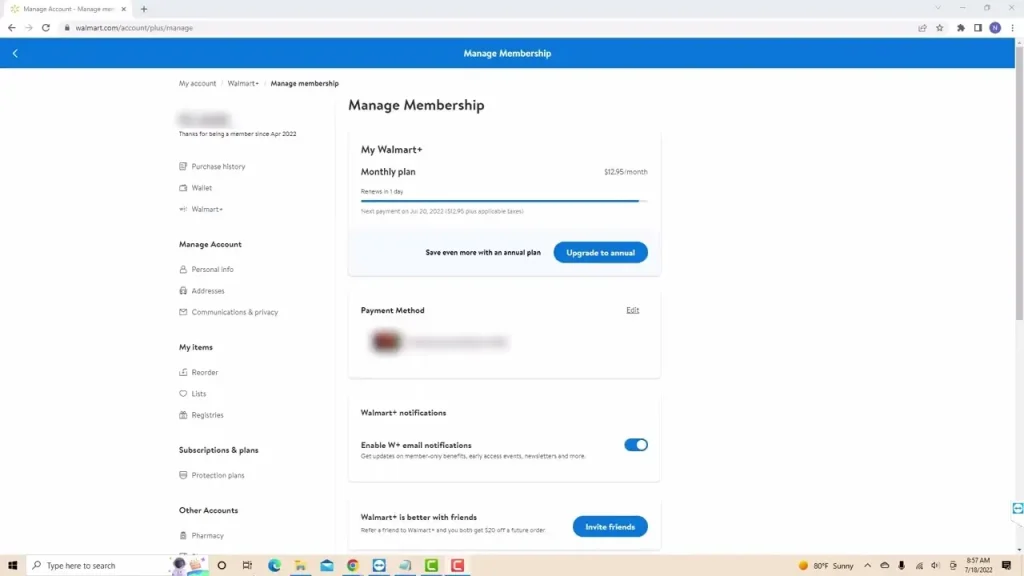
Here is how to cancel your Walmart Plus membership:
1. Log into your Walmart account
- Access Walmart’s website or the Walmart mobile application.
- Use your login credentials to access the account associated with your Walmart Plus membership.
2. Navigate to Account Settings
- Upon successful logging in, just recognize the symbol of your profile or a menu at the top right of the screen and click there.
- Press the “Account” tab from the dropdown menu to gain access to your account settings.
3. Select “Walmart Plus”
- Select the department specifically designated for the Walmart Plus and/or subscriptions category on the Account Settings tab.
- Press the bar to see your membership in detail.
4. Click “Cancel Membership”
- Get to the end of the Walmart Plus page which is where you can remove the subscription.
- Now, you need to click on “Cancel Membership” so that the entire process may start.
5. Confirm Your Cancellation
- You may also have to give feedback to Walmart for quitting. If you want, you can just fill something or leave it as it is.
- Closing the process out with a simple “Yes” and clicking on the confirmation button will guarantee that you’ve successfully canceled your membership.
What Happens After You Cancel Your Walmart Plus Membership?
Knowing what to expect after you cancel will make managing your subscription easier for you:
- Access Until End of Billing Cycle: If you’ve paid for the current month or year, you’ll have access to Walmart Plus benefits until the end of the billing cycle.
- No Refunds for Partial Months: Walmart usually does not refund the unused days in a billing cycle. This is important to note before canceling.
- Reactivating is a Breeze: If you change your mind, you can reactivate membership by logging into your account at any time and re-subscribing.
Can you cancel Walmart Plus Membership over the phone?
Yes! If you want to speak to a representative, you can call Walmart Customer Service at 1-800-924-9206. You will need to give them your account information and ask for cancellation. This may be easier if you have problems online.
Alternatives to Cancel Walmart Plus Membership
Not ready to cancel completely? Here are some options to modify your membership:
- Opt for monthly billing: go for a monthly rather than an annual plan in order to minimize long-term costs.
- Maximize Benefits: Schedule your shopping trips to utilize free delivery and discount on fuel most effectively.
- Downgrade to Free Account: This will use a normal Walmart account without the benefits of Walmart Plus.
- Share membership: Share the cost of membership with family or friends so that it becomes affordable.
- Seasonal Reactivation: Rescind today and join during peak times, such as holidays.
These options will help you retain control over your subscription without losing access.
Refund Policy Details
Understanding the refund policy is very important when canceling your Walmart Plus membership.
- No refunds on partial month or annual membership purchases: Walmart usually does not offer a refund on unused parts of the subscription. Once cancelled within a cycle, benefits stay on until the cycle’s billing is complete.
- Free Trial Cancellation: During your free trial, ensure to cancel before it ends to prevent additional fees for the next billing cycle.
- How to Check Refund Eligibility: In some instances, refunds can be made regarding billing errors. If you feel that you were billed in error, you can reach Walmart Customer Service at 1-800-924-9206 for help.
With these details, you would be able to manage your finances properly as you cancel Walmart Plus.
What are the consequences of multiple cancellations or Reactivations?
Currently, Walmart Plus does not have penalties or restrictions when a member cancels multiple times or reactivates the membership. However, frequently cancelling and reactivating your subscription may attract some of the following things:
- Billing Cycles: Every time you reactivate your Walmart Plus, you will be charged by the current pricing, and you will not be able to maintain previous promotional rates or discounts.
- Loss of Benefits: You will lose limited-time benefits or promotions that Walmart Plus members receive if you cancel and reactivate several times because the benefits are tied to active subscriptions.
- Account Management: You may have noticed that constant cancellations and reactivations can create confusion in your account management and billing history, so it’s good to keep track of when you cancel and reactivate to avoid any potential issues with payments.
Although there is no direct effect, the frequent cancellation and reactivation may be inescapable, but this might affect your general membership experience.
Conclusion
Canceling a subscription sounds like a chore, but with these steps, you can manage your Walmart Plus membership easily. Whether you step away for a little while or forever, you are now empowered to take charge of your subscriptions.
You May Also Like
How to Turn Off Voicemails in iOS 18
How To Share a Playlist on Apple Music with Others
How to Use SearchGPT AI Search Engine?
FAQs
1. Can I Pause My Walmart Plus Membership Instead of Cancelling?
No. Walmart Plus does not have pause options for membership. When you want to stop, you’ll have to cancel your subscription, and in the future, if necessary, you can simply reactivate it.
2. When I cancel my Walmart Plus membership, will my stored payment information remain active?
Your payment information is stored in your Walmart account until you manually delete it. Canceling your Walmart Plus membership will not remove the stored payment methods.
3. If I Cancel Walmart Plus Membership will it Impact My Walmart Account?
No, canceling your Walmart Plus membership only stops the subscription services associated with it. You can continue to use your Walmart account for shopping and other activities.
4. Can I Cancel My Walmart Plus Membership From the Mobile App?
Yes, you can cancel your membership directly through the Walmart mobile app by just following similar steps to that in the desktop guide. It is really not a hassle or cumbersome process.
5. How Long Is Walmart Plus’ Grace Period after Cancelling?
No, there isn’t a grace period if you cancel your membership, but you will still maintain Walmart Plus benefits until the end of your current billing cycle. Once that cycle has ended, the subscription won’t be active anymore.
You are reading this blog on info hacker.
