

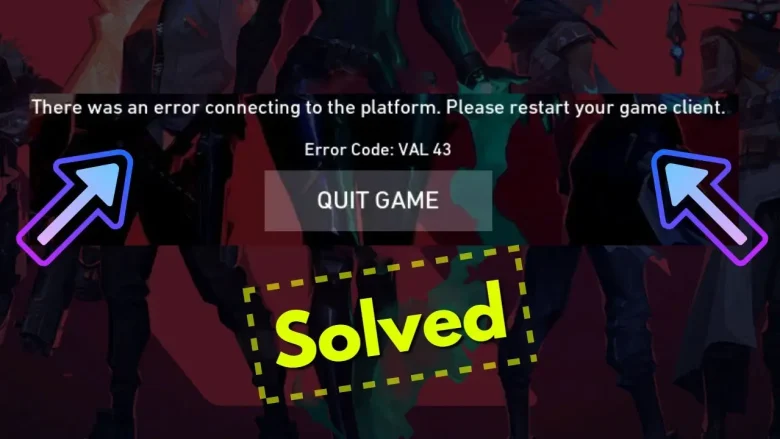
Valorant, Riot Games’ flagship FPS game, is known for its intense gameplay and competitive environment. But nothing kills the vibe more than an error code popping up, especially one like VAL 43. If you’ve encountered this issue of Valorant error code VAL 43, don’t worry—you’re not alone, and this guide is here to help you fix it.
What Is Valorant Error Code VAL 43?
Error Code VAL 43 typically appears when the Riot Client fails to connect to its platform services. This can be caused by server maintenance, connection issues, or client-side problems. The result? You’re stuck on the loading screen, unable to join the action.
Common Causes of VAL 43
- Server Downtime
Riot’s servers might be undergoing maintenance or experiencing outages. - Network Issues
An unstable or slow internet connection can disrupt communication with the game servers. - Client Errors
Glitches or bugs in the Riot Client can prevent proper authentication. - Corrupted Files
Damaged or missing game files can trigger this error.
Basic Checks Before You Begin With a Fix For Valorant Error Code VAL 43
Before diving into fixes, make sure you’ve covered the basics:
- Check Server Status: Visit the Riot Games Service Status page to see if servers are down.
- Restart Your PC and Router: A quick reboot can resolve temporary glitches in your system or network.
- Ensure a Stable Internet Connection: Use a wired connection or ensure your Wi-Fi is strong.
Step-by-Step To Fix for Valorant Error Code VAL 43
How To Fix for Valorant Error Code VAL 43 For Windows Users
- Restart Riot Client
- Close the Riot client completely.
- Open Task Manager (Ctrl + Shift + Esc) and end all Riot-related processes.
- Relaunch the Riot Client and log in.
- Run Riot Client as Administrator
- Right-click the Riot Client shortcut.
- Select Run as Administrator.
- Flush DNS Cache
- Open Command Prompt as Administrator.
- Run the following commands:
ipconfig /release
ipconfig /renew
ipconfig /flushdns - Restart your PC and launch the game.
- Update Riot Client and Valorant
- Open the Riot Client, check for updates, and install them.
- Reinstall Riot Client and Valorant
- Uninstall Riot Client and Valorant.
- Download and install the latest versions from the official Riot Games website.
How To Fix for Valorant Error Code VAL 43 For Mac Users
- Restart Riot Client
- Force quit the Riot client via Activity Monitor.
- Restart the client.
- Run Riot Client as Administrator
- Right-click Riot Client in your Applications folder and select Open.
- Flush DNS Cache
- Open Terminal and run:
sudo killall -HUP mDNSResponder - Restart your Mac and launch the game.
- Open Terminal and run:
- Update Riot Client and Valorant
- Check for updates in the Riot Client and install them.
- Reinstall Riot Client and Valorant
- Uninstall both Riot Client and Valorant.
- Download and reinstall the latest versions from the Riot Games website.
Fix for Valorant Error Code VAL 43 For Laptop Users (Windows or Mac)
- Restart Riot Client
- Use Task Manager (Windows) or Activity Monitor (Mac) to close any running Riot processes.
- Restart the client.
- Run Riot Client as Administrator
- Right-click Riot Client > Run as Administrator (Windows).
- Flush DNS Cache
- Follow the steps for flushing DNS cache in Command Prompt (Windows) or Terminal (Mac).
- Update Riot Client and Valorant
- Check for updates in the Riot Client and install them.
- Reinstall Riot Client and Valorant
- Uninstall both programs.
- Download the latest versions from the Riot Games website.
How To Fix for Valorant Error Code VAL 43 For Mobile Users (If You Play Riot Games on Mobile)
- Restart the Mobile App
- Close and reopen the app.
- Clear Cache and Data
- Go to Settings > Apps > Your App > Storage > Clear Cache.
- Update the Game and App Store
- Check for updates in the App Store or Google Play for both the game and mobile OS.
Alternative Methods To Fix Valorant Error Code VAL 43
If the standard fixes didn’t work for you, here are some additional troubleshooting steps:
- Disable Firewall/Antivirus Temporarily: Sometimes, security software can block Riot Client’s connection. Temporarily disable your firewall or antivirus and check if the error persists.
- Change DNS Settings: Switching to a public DNS server, like Google’s (8.8.8.8 and 8.8.4.4), can resolve connection issues.
- Check System Requirements: Make sure your PC meets Valorant’s minimum system requirements. Sometimes, performance issues can cause errors.
How to Avoid Error Code VAL 43
- Check Server Status Regularly: Before logging in, verify if servers are undergoing maintenance.
- Maintain a Stable Connection: Use reliable internet to avoid disconnection issues.
- Keep Your Software Updated: Regular updates ensure compatibility and fix bugs.
What Happens If You Do Not Fix Valorant Error Code VAL 43?
Ignoring Valorant Error Code VAL 43 isn’t exactly the best idea, especially if you’re eager to jump back into the action. Here’s what happens if you choose to overlook this issue:
- You Won’t Be Able to Play
VAL 43 prevents the Riot Client from connecting to its platform services, which means you’ll be stuck at the loading screen. Until the error is resolved, you won’t be able to log in or access the game. - Missed Opportunities in Competitive Play
If you’re in the middle of climbing the competitive ladder or participating in a ranked match with friends, ignoring VAL 43 could mean missing out on valuable progress or rewards. - Potential Escalation of the Problem
Sometimes minor client issues can snowball into larger ones if left unaddressed. For example:- Corrupted files could worsen, requiring a complete reinstall.
- Outdated software might lead to compatibility problems down the line.
- Frustration Builds Over Time
The longer you wait to fix VAL 43, the more frustrating it becomes to rejoin your favorite game. Simple issues like this often have straightforward solutions, so there’s no need to delay.
Conclusion
While Error Code VAL 43 can be frustrating, it’s usually a temporary issue. Following these steps to fix Valorant error code VAL 43 should have you back in the game quickly. If the problem persists, reach out to Riot Support for further assistance.
You May Also Like
How to Fix Valorant Error Code VAL 5
How to Fix Valorant Error Code 81
How to Fix Valorant Crashing on Windows
Valorant Error Code Van 79? Here’s The Fix
Valorant Error Code VAN 84: How to Get Back in the Game Fast
FAQs
1. How Do I Know If the VAL 43 Error Is Due to Server Maintenance?
You can check if the error is due to server maintenance by visiting the official Riot Games Service Status page. If there’s a known outage or maintenance scheduled, the page will provide updates on when you can expect the servers to be back online.
2. Can a VPN fix Valorant error code VAL 43?
In some cases, using a VPN to change your region or IP address might help resolve connection issues causing VAL 43. However, using a VPN can also add latency, so it should only be a temporary solution to test if your internet connection is being blocked.
3. Does Reinstalling Valorant Fix VAL 43 Permanently?
While reinstalling Valorant can fix Valorant error code VAL 43 temporarily by replacing corrupted files or resolving client-side issues, it’s not always a permanent solution. If the problem persists, it could be related to server downtime or network issues that reinstalling the game won’t address.
4. How Long Does It Take for Riot to Fix VAL 43?
The time it takes for Riot Games to fix Valorant error code VAL 43 can vary depending on the underlying issue. If it’s due to server maintenance, Riot typically provides an estimated time for completion. For client-side or network issues, fixes are usually quicker, but it may take a few hours if there are widespread problems.
5. Can I get banned for error code VAL 43?
No, you won’t get banned for encountering Error Code VAL 43. It’s typically caused by connectivity issues, server problems, or client-side errors, none of which are related to cheating or violating Valorant’s terms of service.
You are reading this blog on iNFo Hacker.
