

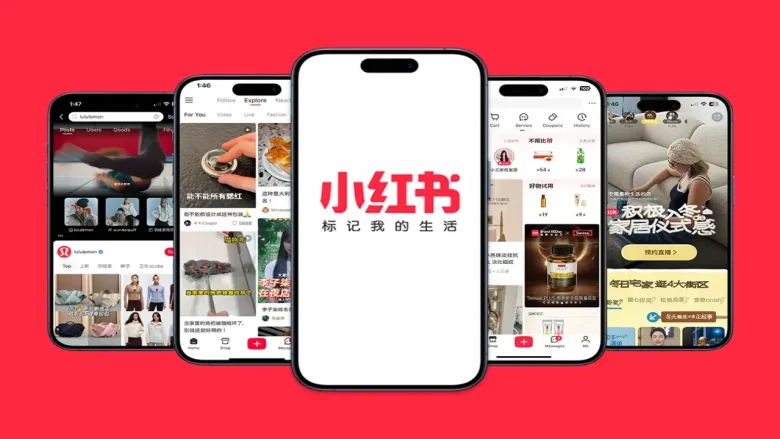
If you’ve heard the buzz around the Red Book app (also known as Xiaohongshu) and want to learn what all the hype is about, you’re in the right place. Combining social media, lifestyle inspiration, and e-commerce into one engaging platform, Red Book has quickly become one of the most popular apps in China—and is gaining momentum globally. Whether you want to discover the latest trends, find honest product reviews, or just scroll through beautiful travel photos, Red Book has something for everyone. Here’s everything you need to know to get started and how to use the Red Book App and make the most of it.
What Is the Red Book App?
The Red Book app is a social media platform that lets users share and discover lifestyle-related content. It’s especially popular for exploring product recommendations, fashion trends, travel inspiration, and much more. While it shares similarities with Pinterest and Instagram, Red Book stands out for its focus on authentic reviews and the ability to seamlessly shop for products directly within the app. Users can follow other creators, engage with their posts, and even purchase items through integrated shopping links.
Key Features:
- Share your experiences through posts and videos.
- Discover trending topics and product recommendations.
- Engage with a community of like-minded users.
How to Get Started with Red Book
If you’re ready to dive into the world of Red Book, here’s how to get started:
Step 1: Download and Install the App
Search for “Red Book” or “Xiaohongshu” in the App Store (iOS) or Google Play Store (Android). Download the app and install it on your device.
Step 2: Create an Account
You’ll need an account to use Red Book. Sign up using your email, phone number, or your social media accounts like WeChat or Google. Create a unique username and upload a profile picture. Once you’ve done this, you can start exploring the app. Set your preferences to personalize your experience.
Step 3: Explore the Interface
Once you log in, familiarize yourself with the layout:
- The home feed shows posts from creators and trending content.
- The search bar allows you to find specific topics or hashtags.
- The Profile Tab lets you manage your posts, followers, and account settings.
How to Use the Red Book App Like a Pro

Maximize your Red Book experience with these tips for discovering, creating, shopping, and engaging effectively:
- Discover and Save Content: Explore posts for inspiration on fashion, travel, or products. Save posts for easy access later. Follow your favorite creators for consistent updates.
- Post Your Experiences: Share photos, videos, and captions that showcase your interests. Use trending hashtags to expand your reach. Add a personal touch to engage your followers.
- Shop Smarter: Red Book offers integrated shopping. Check product reviews and ratings before buying. Direct product links let you shop without leaving the app.
- Engage with the Community: Like, comment, and share to interact with others. Building relationships helps personalize your feed. Engage consistently to stay visible in the community.
- Participate in Trends: Join popular trends and challenges to boost your visibility. Red Book thrives on viral content, so hopping on trends can quickly increase your reach.
- Use Hashtags Effectively: Hashtags are crucial for discoverability. Use relevant and trending hashtags to help your content reach a wider audience.
- Collaborate with Creators: Partner with others for cross-promotion. Collaborations allow you to tap into different audiences, helping you grow your follower base.
- Follow and Engage with Influencers: Connect with influencers in your niche. Their posts often lead to new trends and can offer valuable insights into creating content that resonates with users.
Benefits of Using the Red Book App
The Red Book app offers a variety of benefits that make it stand out from other social platforms:
- Discover Global Trends: One of the key advantages of using Red Book is its global reach. You can explore content from creators around the world, offering a unique perspective on trends in fashion, beauty, travel, and more.
- Trustworthy Recommendations: Unlike other social platforms, Red Book is known for its authentic, user-generated content. You won’t have to worry about sponsored posts or misleading promotions. When a user shares a product recommendation, you can trust it’s their honest opinion.
- Seamless Shopping: Red Book integrates shopping directly into the platform, so you can browse and shop without needing to leave the app. Many posts include affiliate links or product recommendations, making it easy to buy items you discover.
- Inspiration for Daily Life: If you’re ever in need of inspiration, Red Book is the perfect place to find new ideas for your outfits, home decor, or even recipes. Whether you’re looking for new skincare routines or dream vacation spots, there’s always something fresh to explore.
Is the Red Book app free?
Yes, the Red Book app is free to download and use. You can access the app on both the App Store (iOS) and Google Play Store (Android) at no cost. The core experience is entirely free, allowing you to browse content, post your experiences, and engage with others without spending a dime. However, there are some features that may incur costs:
- Shopping: You can purchase products directly from links within posts.
- Premium Content: Some creators offer exclusive content that may require a subscription or payment to access.
How to Gain Followers on Red Book
If you want to grow your following on Red Book and increase your visibility, here are some tips to help you succeed:
- Create High-Quality Content: The foundation of any successful Red Book account is high-quality content. Post visually appealing photos and engaging videos that capture your personality or expertise. Thoughtful captions can make your posts more relatable and engaging.
- Post Regularly: Consistency is key to growing your following. Posting regularly helps keep you visible on the platform and ensures that your content appears on followers’ feeds. Find a posting schedule that works for you and stick to it.
- Engage with Others: Interacting with other users is a great way to increase your visibility and build connections. Like, comment, and share posts from users who share similar interests. Engaging with others’ content can often lead to reciprocal interactions.
- Use Hashtags: Hashtags are essential on Red Book for expanding your reach. Use relevant and trending hashtags in your posts to make them discoverable to users outside your current follower base.
- Participate in Trends: Join in on popular trends, challenges, or viral content. This is an excellent way to get noticed and increase engagement with your posts.
- Collaborate: Collaborating with other creators on Red Book can help you cross-promote each other and grow your following. Partnering with influencers or other content creators can open up new audiences and bring more attention to your profile.
Popular Content Categories on Red Book
Red Book is known for its diverse content, and there are several categories that attract large audiences:
- Fashion and Beauty: Fashion enthusiasts share outfit ideas, makeup tutorials, skincare routines, and product reviews. This category is one of the most popular on the platform.
- Travel: Travel lovers use Red Book to share breathtaking photos, guides, tips, and itineraries for destinations around the world. Whether you’re into beaches or city escapades, you’ll find plenty of inspiration here.
- Food: Foodies flock to Red Book for recipes, restaurant reviews, and food photography. Discover new recipes, local eateries, and cooking tips from people all over the world.
- Fitness and Wellness: Fitness enthusiasts share workout routines, nutrition advice, and wellness tips. Whether you’re looking for yoga inspiration or strength training ideas, you’ll find it on Red Book.
- DIY and Home Decor: Creative users post DIY projects, home improvement tips, and interior design ideas. This category is perfect for those who love crafting and want to beautify their living spaces.
- Tech: Tech lovers find gadget reviews, unboxings, and tutorials. Stay up to date with the latest in technology by exploring content from tech-savvy creators.
Conclusion
Red Book is more than just an app; it’s a vibrant community where you can find inspiration, share your passions, and shop for products you love. Whether you’re exploring new trends, planning your next vacation, or finding honest product recommendations, Red Book offers something for everyone. By following this guide, you’ll be well-equipped to get into the app, gain followers, and become an active participant in the ever-growing Red Book community.
You May Also Like
How to Use Widgetable Sleep Tracker?
MyPascoConnect: Guide to Pasco County’s Educational Portal
How To Download Self Quest App On Android
What is Pengu App & How To Use it?
FAQs
1. Can I Use the Red Book App Without an Account?
No, an account is required to use the Red Book app. Signing up is free, and it allows you to post content, save favorites, and interact with other users.
2. Is Red Book Available in Languages Other Than Chinese?
Yes, Red Book is available in multiple languages, including English. You can adjust the language settings in the app’s settings menu.
3. Can I Shop Directly on Red Book?
Yes, you can purchase products directly from posts that include shopping links.
4. Are There Any Age Restrictions on Using a Red Book?
Yes, Red Book is intended for users aged 13 and above.
5. Can I Edit My Posts After Publishing?
Yes, you can edit your posts after they are published. Simply go to your profile, select the post, and make changes as needed.
6. Is Red Book Available Outside of China?
Yes, Red Book is available internationally and is gaining popularity in various countries.
You are reading this blog on iNFo Hacker.
