

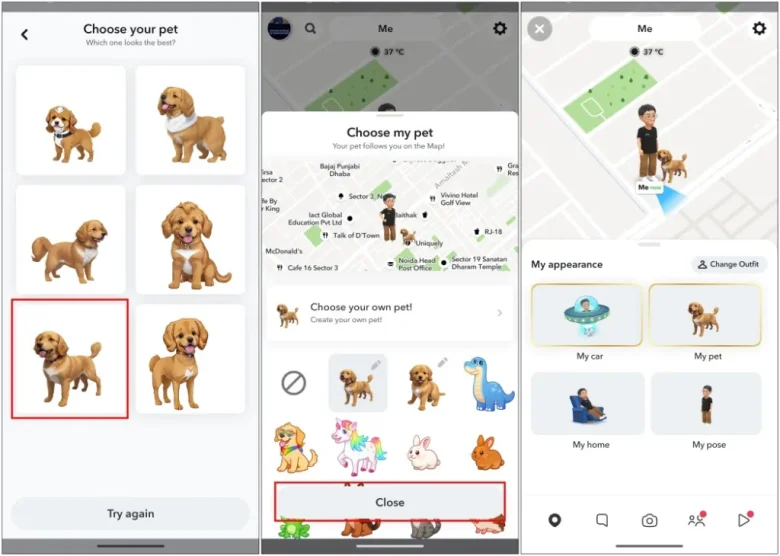
Snapchat came with another great feature recently you can now add your pets to snapchat. As a pet lover, I was always in search of how can I add my pets thanks to snapchat for this great feature. I did it yesterday now I am going to share with you how to add pet in snapchat.
Nowadays you will find a lot of stories, Snapchat maps, and many more with pets. That fascinates pet lovers but most of them dont know how to add them. This guide is for you Let’s go and explore this amazing feature.
How To Add Pet In Snapchat
To add a pet to your Bitmoji on the Snapchat map, follow these steps:
- Open Snapchat and go to your Profile
- Tap on your Snapchat+ membership card
- Select ‘Map Appearance’
- Choose ‘Add a Pet’ and pick from the available options
Note that adding pets is currently only available for Snapchat+ subscribers. If you don’t have an active Snapchat+ membership, you won’t see the option to add pets.
How do I switch between different Pets On Snapchat?
To switch between different pets on the Snapchat map:
- Open Snapchat and go to the Map view by tapping the map icon at the bottom.
- Tap on your Bitmoji avatar in the bottom left corner.
- Select “My pet” from the menu that appears.
- Here you will see the different pet options available to you as a Plus subscriber. Tap on the pet you want to switch to.
- The new pet will now appear next to your Bitmoji on the map.
You can switch between the available pet options as many times as you want. The best part you can add your dog on snapchat check here how.
How Do I Create A Custom Pet From A Photo On Snapchat?
To create a custom pet from a photo on Snapchat follow the below steps.
- Open Snapchat and go to the Map view by tapping the map icon at the bottom.
- Tap on your Bitmoji avatar in the bottom left corner.
- Select “My pet” and choose “Choose your own pet!” from the menu.
- Pick an image of your real-life pet or other object from your phone’s gallery. The app will try to recognize it and turn it into an avatar.
- Snapchat will show you 6 options based on the image you selected. Choose whichever one you prefer as your custom pet.
- Tap “Close” to add your new custom pet to the Snapchat map next to your Bitmoji.
Final Thought
You can now add a pet to snapchat by using this guide. Remember, this feature is open to snapchat + users. I hope snapchat will allow all users to have this feature in the future. There is also a lot that you need to know like How to use best friend bitmoji together feature on snapchat and many more. Now, go and take your pets in front of the camera and enjoy with them on snapchat.
Frequently Asked Questions
To add it on Snapchat, access your Profile, tap your Snapchat+ membership card, select ‘Map Appearance’, and choose ‘Add a Pet’ from the options.
To switch pets on Snapchat, go to the Map view, tap your Bitmoji avatar, select “My pet”, and choose from the available options.
To create a custom on Snapchat, go to the Map view, tap your Bitmoji avatar, select “My pet”, choose “Choose your own pet!”, pick an image from your gallery, select your preferred avatar, and tap “Close” to add it.
