

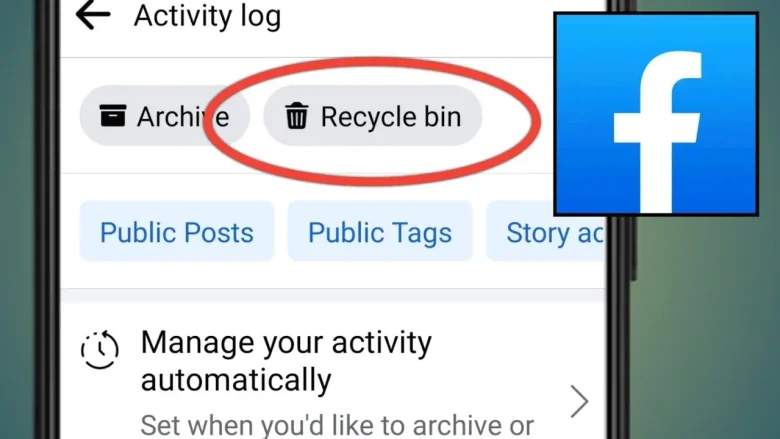
You feel really bad when you accidentally delete a post, a picture, or the comment on Facebook because there is no immediate need to freak out. Facebook has, in fact, made a feature known as the Trash; it’s also sometimes called the Recycle Bin. They allow the user to recover something, so you never really lose things before they’re lost forever. In this guide, we will show you how to find a recycle bin on Facebook, what kinds of content you can recover, and tips on managing your posts and media.
What Is Facebook’s Recycle Bin (Trash)?
Facebook’s Recycle Bin is actually a Trash section within your Activity Log. It’s not a physical “bin” you see on your home screen, but a temporary holding space for deleted content. When you delete something on Facebook—whether it’s a post, photo, video, or comment—it’s not gone for good immediately. Instead, it’s stored in the trash for up to 30 days. This gives you a grace period to recover deleted items before they are permanently erased.
This feature comes very handy with a safety of accidental deletion feature, but its 30-day window is after which the item goes into permanently and cannot be retrieved back.
How to Find the Recycle Bin (Trash) on Facebook
If you delete content accidentally and find that you want it back, here’s how to find and access your recycle bin on Facebook.
Step 1: Open the Facebook app or website. How to Find the Recycle Bin (Trash) on Facebook
Before the actual recovery procedure, you will need to access your account on Facebook. It doesn’t matter whether you are using a desktop through the browser or a mobile device using an application. The process is quite similar but a bit different in terms of procedure.
Desktop:
- Launch your web browser and navigate to facebook.com.
- Log in to your account.
- Click the downward arrow or your profile picture on the top right.
- In the dropdown menu, click Settings & Privacy and then Activity Log
Mobile:
- Launch the Facebook app.
- Tap the three horizontal lines on the bottom right on iOS or on the top right side on Android.
- Scroll down and tap Settings & Privacy, then select Activity Log.
Step 2: Find the Recycle Bin in Facebook
Once you get into the Activity Log, here’s what you do to locate the items you deleted from your Facebook page.
Desktop:
- On the Activity Log page, scroll down on the left sidebar to find Trash. All your posts, comments, or other deleted items will appear.
Mobile:
- Open the Activity Log and scroll down to tap the trash under “Your Posts.”.
Step 3: Recover deleted items
If you look for the thing you want to recover in Trash, you can easily restore it.
- Tap or click the item you’d like to reappear – a post, a comment, photo, etc.
- You will also find an option to restore it to your timeline or permanently delete it.
It’s that simple!
Things to Keep in Mind
- Time Limit: Facebook retains the deleted items in the trash for only 30 days. After that, it cannot be retrieved and is completely deleted.
- What Can Be Recovered: Posts, photos, comments, and videos can be recovered. Message or conversation deleted won’t appear in the trash.
- Privacy Concerns: If you are concerned about privacy or stuff that really needs to stay deleted, note that after 30 days are up, the stuff is lost forever.
What Can You Recover From Facebook’s Trash?
The trash feature in Facebook isn’t limited to only posts. What you can recover:
- Posts: removed status updates, shared posts, or articles.
- Photos & Videos: Media that were removed from your timeline.
- Comments: Any comments that you have removed, either the ones on your posts or even others’ posts.
- Likes: In some cases, likes that were removed from posts may be recoverable, depending on the circumstances.
However, messages in Facebook Messenger do not go to the trash. Once a message is deleted from Messenger, it cannot be recovered from the Trash section of the Activity Log. Other types of content, like Facebook Stories, aren’t included in the trash either.
Why Items Are Deleted and Stored in the Trash
Facebook doesn’t immediately permanently delete content after you hit “Delete.” Instead, the platform moves your deleted items to the trash for the following reasons:
- Accidental deletions: Quite often, we delete something that we did not intend to do. The feature of the trash ensures that the content is not lost forever and you are given a chance to retrieve it.
- Content Moderation: Facebook removes content that violates community guidelines or terms of service. Such content may temporarily go into the trash for review, during which time you can appeal or request the recovery of the content.
- User Control: Facebook knows that sometimes we delete things on impulse or by mistake. The trash gives you a grace period to reconsider before deleting something permanently from your profile.
This 30-day grace period is convenient but also ensures you have the flexibility to restore your deleted items before they are lost for good.
The 30-Day Limit: Why It Matters
Once content is placed in the trash, it automatically stays there for 30 days. It’s for 30 days because:
- Recovery window: For an accidentally erased important document, the recovery window is 30 days. Any document beyond the recovery window period will be automatically and permanently erased as part of its default and automatic procedure.
- Facebook Storage Management: The 30-day limitation also helps keep the old content from being unnecessarily accumulated on Facebook’s storage. A huge volume of data is handled daily by Facebook; hence, such helps in keeping the platform running efficiently.
This is a critical time limit. You might never have a chance to retrieve your content if you wait too long.
How to Manage Your Deleted Content Effectively
Facebook’s Trash is really convenient, although now its real value lies in the fact that you must take responsibility for managing your deleted content. Here’s how to stay organized:
- Use the Archive Feature: If you don’t want to completely delete content from your timeline, you can archive it instead. Archived posts and photos are hidden from your timeline and can be retrieved at any time without harming their permanent existence status.
- Review Your Trash Often: Do not wait until nearly the end of the 30-day window, but check your trash often to recover important content before it’s gone for good.
- Don’t Delete on Impulse: Before deleting something, think whether you are sure about the decision. If you are not sure, then hide the post or photo instead of deleting it. You can make it visible again later.
Therefore, with an organized Facebook account and reviewing your trash from time to time, you are saving the headache of losing your important content.
Conclusion
Now you know how to find a recycle bin on Facebook; this is a feature through which deleted content can be recovered before it is gone forever. Knowing where the trash is, managing content responsibly, and being aware of the 30-day limit helps one avoid accidentally deleting things and makes sure you don’t lose valuable memories.
Ever found something in the trash on Facebook? Share your experience in the comments below and let us know how it helped!
You May Also Like
How to See Who Viewed Your Facebook Profile Recently!
How to Generate Images From WhatsApp Meta AI in Realtime!
How to Turn Off Voicemails in iOS 18
FAQs
1. Can I access the feature of Trash using the Facebook Lite app?
The Facebook Lite application does not allow you to avail the facility of Trash as yet. In order to recover something, you’ll have to login using the application or even a web browser.
2. Does the platform notify someone else that a post or a comment was deleted and is restored?
No, Facebook will not send anyone a notification that you have recovered a deleted post, photo, or comment. It just pops back up on your timeline or where it originally was.
3. Can I recover deleted Facebook stories from the trash?
No, Facebook Stories do not appear in the trash when you delete them. Once you delete a story, it is gone for good and cannot be recovered.
4. Is there any way to stretch the 30-day limit of items in Trash?
No, Facebook does not provide an extension of the limit. After these 30 days, all the items in Trash are permanently deleted and cannot be recovered.
You are reading this blog on info hacker.
