

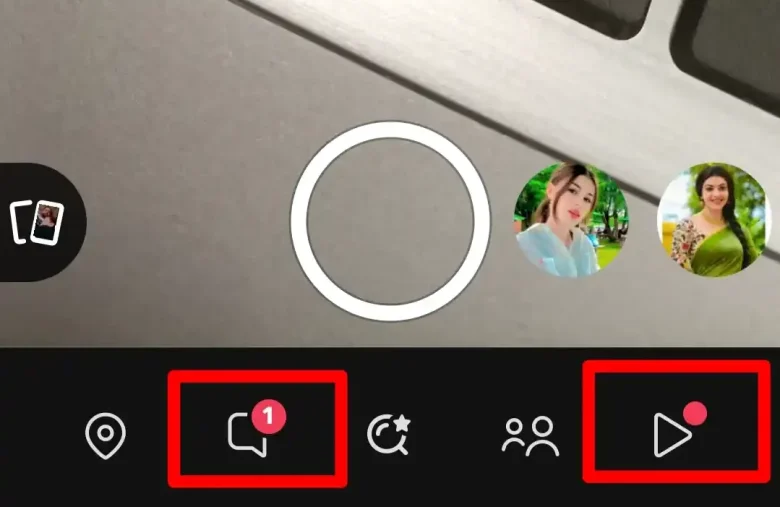
There is a lot to explore on snapchat not mere sending snaps is enough. If you want to dominate the snapchat you need to master even a small setting there. This guide is equipped with what does red dot mean on snapchat.
Snapchat has another dot also that I have already covered i.e. Snapchat green dot check out it. Now, you are confused about this red dot I knew it. Let’s jump deep in a dive to explore this dot also. Stick with me to the end and know more about it.
The Red Dot Mean On Snapchat Explained Here
Have you noticed the red dot on Snapchat? It means you have new stuff to check out. You’ll see this dot next to your Bitmoji. It also shows up on chat, friends, Spotlight, and Memories icons. Before, these dots were blue.
Now they’re red. Why the change? Snapchat wanted to make alerts easier to spot. Also, they wanted to look more like other social media apps. These apps use similar red dots too. So now, when you see a red dot, you know something new is waiting for you.
How To Turnoff Red Dot On Snapchat
To turn off the red dot notifications on Snapchat, follow these steps:
- Open Snapchat: Launch the Snapchat app on your device.
- Clear Notifications: The red dot signifies unread notifications. To remove it, open and check all your messages and notifications across chat, friends, Spotlight, and Memories.
- Log Out and Log Back In: If the red dot persists, log out of your Snapchat account and then log back in. This can often resolve any issues causing the persistent dot.
- Restart Your Device: If logging out doesn’t resolve the issue, try restarting your phone. This may resolve minor app glitches affecting the notification indicator.
- Notification Settings: While you cannot customize the red dot itself, you can manage your overall notification preferences in your device’s settings menu to adjust notifications from Snapchat.
Please note that the red dot is a standard part of Snapchat’s notification system and cannot be permanently turned off. It is designed to alert users of new activity within the app.
How Can I Make The Red Dot Disappear If I’ve Already Opened All My Notifications?
If you’ve already reviewed all your notifications on Snapchat but the persistent red dot continues to show up, it could be due to a technical issue or an unresolved action linked to your profile. Here are steps you can follow to troubleshoot and resolve the problem:
1. Check Your Profile
Tap on your Bitmoji to access your profile. Scroll down to check if there are any pending notifications or actions that need your attention, such as friend requests or updates.
2. Mark All Notifications As Read
If available, look for an option like “mark all as read” within the notifications section. Sometimes, this can help in clearing the persistent red dot.
3. Log Out And Log Back In
If the red dot persists after reviewing your notifications, try logging out of your Snapchat account and then logging back in. This process can refresh the app and potentially resolve the issue.
4. Restart Your Device
Restarting your mobile device can also resolve minor glitches within the Snapchat app that may be causing the persistent red dot.
5. Wait For Updates
If none of the above methods work, it may be a temporary glitch that could be resolved in a future Snapchat update. Keeping your app updated to the latest version can sometimes fix such issues.
Conclusion
Let’s wrap this up. The red dot on Snapchat is a handy alert. It tells you when new stuff pops up. It used to be blue, but now it’s red. Why? To catch your eye better. You’ll spot it by your Bitmoji and other icons. It means you’ve got unread messages or updates.
Want to clear these alerts? Just open the app and check your stuff. If it’s stuck, try logging out and in again. Or restart your phone. Sometimes, waiting for an app update helps too.
You can’t turn off the red dot for good. But now you know what it means. It’s there to keep you in the loop on Snapchat. Pretty useful, right?
Frequently Asked Questions
The red dot on Snapchat indicates that you have new notifications or activity waiting for you within the app. It appears next to your Bitmoji and on icons like chat, friends, Spotlight, and Memories, signaling unread content.
No, the red dot is a standard feature of Snapchat’s notification system and cannot be permanently turned off. It is designed to alert users of new activity within the app.
If you’ve reviewed all notifications and the red dot persists, try tapping on your Bitmoji to access your profile and check for any pending actions or updates. You can also try marking all notifications as read, logging out and logging back in, restarting your device, or waiting for a Snapchat update that may resolve the issue.
Snapchat changed the dot color from blue to red to make notifications more noticeable and consistent with other social media apps. The red color helps users quickly identify new activity within the app.
You Are Reading This Blog On Haccker
